
 Mike Brown•January 20, 2025•8 min read
Lost in Translation: When Your Cleaner Speaks Spanish and You Speak... Hand Gestures
It's 2:47pm on a Friday. Your guest checks in at 4pm. Your phone buzzes with a text from your cleaner, Maria:
"Las toallas no están aquí. ¿Dónde?"
You stare at your phone. You copy-paste into Google Translate. "The towels are not here. Where?"
Which towels? The bathroom towels? The pool towels? The ones you bought last week that you specifically told her were in the linen closet? And why is she asking you this NOW, 73 minutes before guest arrival?
You reply: "Linen closet upstairs"
Maria replies: "¿Cuál armario?"
Google Translate: "Which closet?"
Your blood pressure spikes. You frantically text back: "The WHITE door. Second floor. Next to bathroom."
Maria: "No comprendo. ¿Foto?"
You're now in your car, driving 20 minutes to show her where the towels are. This is your life now.
Or is it?
End the Google Translate Chaos
listo shows your team photo checklists in their own language and translates their notes back to yours — automatically. No more frantic drives just to point at a closet.
Get listo freeWelcome to the Language Barrier Problem
If this sounds familiar, you're not alone. About 60-70% of US vacation rental cleaning teams speak Spanish as their first language. In Florida, Texas, California, and Arizona, that number goes up to 80%.
Here's the thing: your Spanish-speaking cleaner is probably great at their job. The language barrier isn't about how good they are - it's about all the daily chances for misunderstanding that turn a simple cleaning into a big problem.
But what if you could create your checklists in English, and Maria could see them perfectly translated in Spanish on her phone? What if her questions appeared in English in your app, and your answers appeared in Spanish in hers? What if the language barrier just... disappeared?
That's not science fiction. That's available right now. But first, let's talk about why the old solutions don't work.
The Classic Miscommunication Scenarios (You've Lived Through All of These)
Scenario 1: The Vanishing Supplies
You: "Please stock the bathroom with toiletries"
What your cleaner heard: "Bathroom... stock... toilet paper?"
What actually happened: Guest arrives to find 47 rolls of toilet paper but zero shampoo, conditioner, or soap.
Guest review: "Adequate TP supply but had to buy our own soap??? 3 stars."
Scenario 2: The Phantom Damage
Text from cleaner: "El espejo está roto"
Google Translate: "The mirror is broken"
You panic. Which mirror? The $800 antique hallway mirror? The bathroom vanity? How badly broken? Do you need to cancel tonight's guest?
You call. She doesn't pick up (she's cleaning). You text: "WHICH MIRROR?? SEND PHOTO!!"
Three hours later, she sends a photo of a small hand mirror with a hairline crack. Cost to replace: $8. Cost to your stress levels: priceless.
Scenario 3: The Great Towel Debate
You (via text): "The towels need to be fluffier"
Maria (confused): "¿Más suaves?" (Softer?)
You (trying to be helpful): "Yes! Fluffy! Like clouds!"
Maria: "¿Nubes?" (Clouds??)
You give up and send her an Amazon link to better towels. She clicks it. It's in English. She has no idea what she's looking at.
Two weeks later, you discover she's been running towels through the dryer three times per load, trying to make them "cloudier." Your electric bill is $140 higher than usual.
But Wait, What About Google Translate?
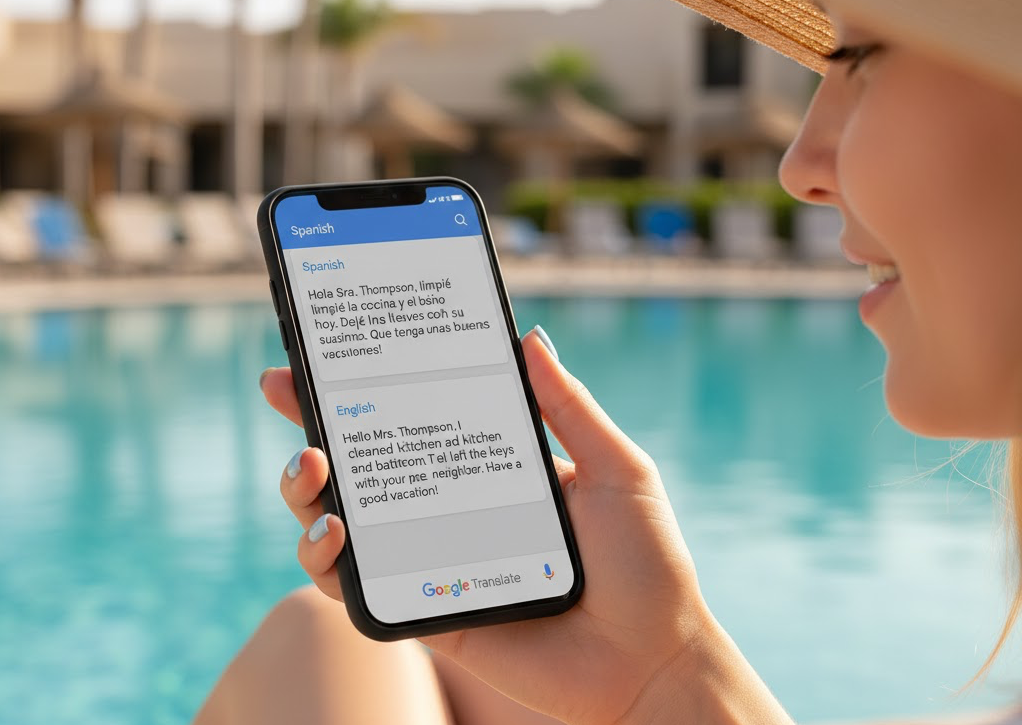
Oh, you sweet summer child.
Yes, translation apps exist. And they're great for translating "Where is the bathroom?" or "I would like a coffee, please."
They are really bad at translating vacation rental instructions:
- "Please make sure the sheets are hospital corners" → "Por favor asegúrese de que las sábanas son esquinas de hospital" (What are hospital corners? She thinks you want medical-style sheets?)
- "The guest complained about the shower pressure" → "El huésped se quejó de la presión de la ducha" (Pressure? Is something broken? Should she call a plumber?)
- "Can you spot-clean the sofa?" → "¿Puedes limpiar el sofá con manchas?" (Clean the couch WITH spots? Add more spots? She's so confused.)
Translation apps fail because vacation rental instructions use special words and phrases that don't translate well. The meaning gets lost.
"I texted my cleaner 'Please fluff the pillows on the bed' using Google Translate. She replied asking if I wanted her to remove the feathers from the pillows. I spent 20 minutes trying to explain via text that 'fluff' means to make them look nice, not to literally remove their contents. Eventually I just sent her a video of me doing it. Now I just take videos of everything."
How This Works With listo:
You create a checklist item in English: "Arrange decorative pillows on bed" with a reference photo showing how the pillows should look.
Maria opens listo on her phone, sees the same item automatically translated to Spanish: "Ordenar almohadas decorativas en la cama" with your reference photo right there.
She arranges the pillows to match your photo, takes a verification photo, and marks it complete. If there's an issue - maybe a pillow is missing - she adds a note in Spanish: "Falta una almohada."
You see her note translated in your app: "One pillow is missing." You reply in English: "Check the bedroom closet." She sees in Spanish: "Revisa el armario del dormitorio."
Total time wasted on translation confusion: zero seconds.
It's Not Just a US Problem
Think language barriers are uniquely American? Ha.
Germany: The Turkish-German Problem
Klaus owns a vacation apartment in Berlin. His cleaning team is Turkish. He speaks German and English well, but not Turkish.
Klaus wanted to explain that guests complained the blanket was too warm. In German: "Die Bettdecke ist zu warm."
His cleaner, Elif, nodded and said "Evet, evet!" (Yes, yes!)
Next guest review: "The apartment was lovely but there was NO DUVET on the bed, just sheets. We froze."
Elif thought Klaus wanted the blanket removed completely. Klaus wanted a thinner blanket. They both understood something different from the same words.
France: The Arabic-French Mix-Up
François manages three apartments in Nice. His cleaner, Amina, is from Algeria and speaks mostly Arabic with some French.
François (in French): "Les serviettes doivent être pliées en trois" (The towels must be folded in three)
Amina understood "serviettes" (towels) and "trois" (three). She put three towels in each bathroom.
François wanted the towels folded into thirds. He got three times as many towels instead. Laundry costs went up. Everyone was confused.
The Real Cost of Language Problems
This isn't just about funny stories. Language barriers cost you real money:
- Wasted Time: The average host spends 4-6 hours per week on extra texts, calls, and emergency visits to the property—just to explain things that would be clear with good communication
- Lower Quality: When cleaners don't fully understand what you want, they can't do it the same way every time. Guests notice this in their reviews
- Missed Problems: Small problems don't get reported because the cleaner doesn't know how to explain them. Those small problems turn into big, expensive emergencies
- Team Members Quit: Good cleaners leave when they feel confused all the time or like they're always "doing it wrong." Finding and training new staff costs money
- Guest Complaints: When things go wrong, guests get disappointed. Disappointed guests write bad reviews. Bad reviews mean fewer bookings
Why Photos Work Better Than Words

Here's what actually works: showing instead of telling.
Not long messages through Google Translate. Not frustrated phone calls where you speak slowly and loudly in English, hoping that will help.
Photos.
Think about it:
- "Make sure the towels are folded like this" = photo of folded towels
- "The throw pillows should be arranged this way" = photo of arranged pillows
- "Stock the bathroom counter with these items" = photo of stocked counter
- "There's damage to report" = photo of the damage
No translation needed. No room for misinterpretation. No lengthy text exchanges. Just: "This is what it should look like."
The Photo Checklist Advantage:
When your team has photo-based instructions to follow, they can see exactly what you want—in any language. And when they take photos to verify their work, you can see exactly what was done—without asking "¿Foto?" seventeen times.
This isn't revolutionary. It's just common sense wrapped in technology.
Real Solutions for Real Hosts
Here's what actually works when managing teams across language barriers:
1. Photo-Based Instructions
Create a reference photo for every task. Not a paragraph of text. Not a translation. A photo showing exactly what "done right" looks like.
Your team doesn't need to understand complex verbal instructions—they just need to see a photo of the desired result. A picture of properly arranged pillows communicates more than any translated paragraph ever could.
2. Photo-Based Verification
Instead of asking "Did you check the bathroom supplies?" and getting "Sí" (which could mean anything from "Yes, I checked" to "Yes, I heard you say words"), request a photo of the stocked bathroom.
The photo tells you everything: Are supplies stocked? Are the quantities right? Is anything missing? All without a single translated word.
3. Visual Issue Reporting
When your team finds a problem, a photo with a simple word ("roto" = broken, "fuite" = leak, "kaputt" = broken) tells you more than five paragraphs of translated text ever could.
You can see the severity. You can see the location. You can decide if it needs immediate attention or can wait. All from one image.
4. Tools That Speak Their Language
If you're using an app or system to manage your team, make sure it works in their language. Having an English-only app when your team speaks Spanish, Turkish, Arabic, or other languages causes problems and mistakes.
This is where modern tools like listo make a huge difference. The entire app interface is fully translated into English, Spanish, French, German, Italian, and Portuguese. Your team member opens the app and sees everything in their preferred language - buttons, instructions, menus, notifications - all in the language they understand best.
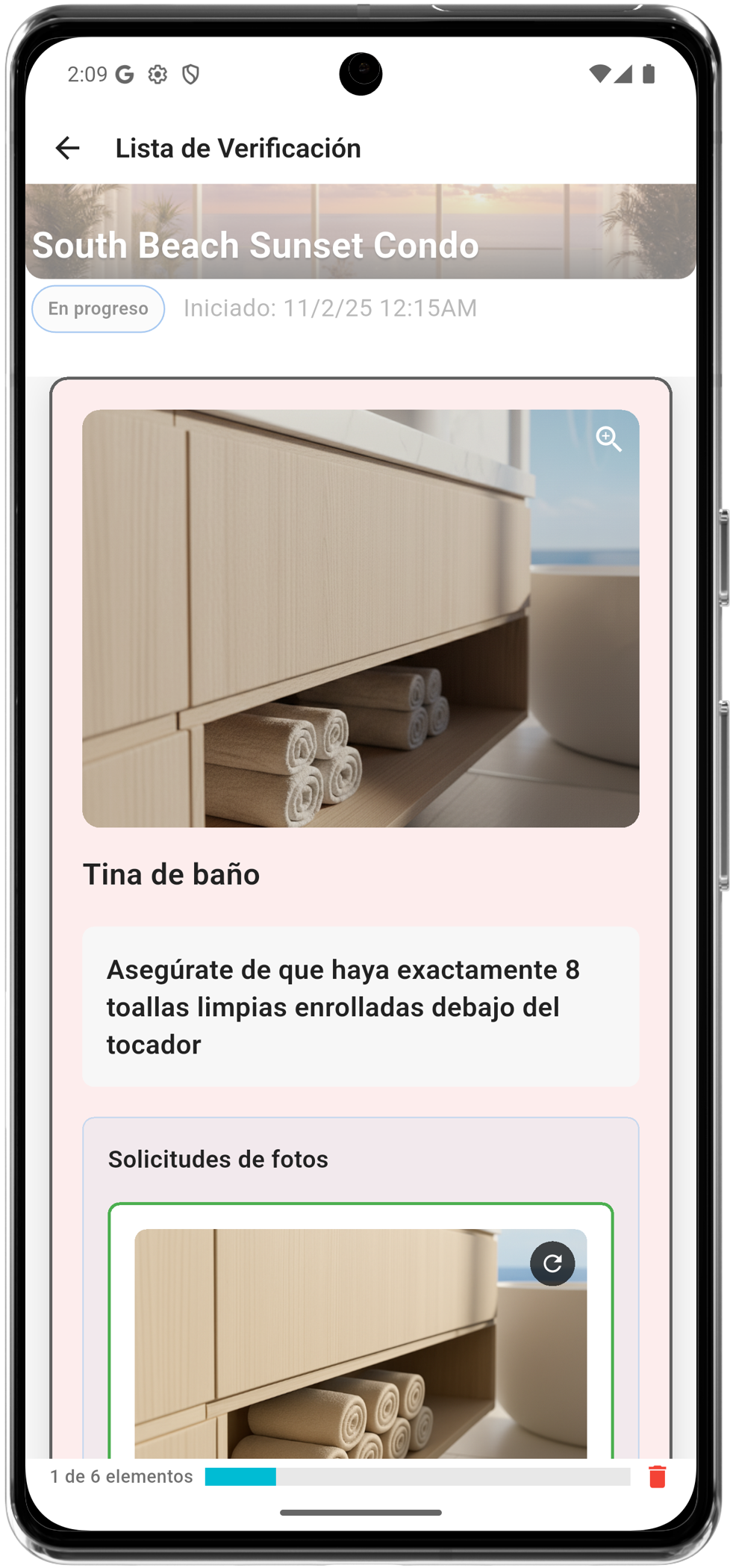
But here's the real game-changer: you don't need to speak the same language as your team.
When you create a checklist in English, your Spanish-speaking team member sees it automatically translated into Spanish in their app. When they add a note or report an issue in Spanish, it automatically appears in English in your app. This happens seamlessly in the background - no copy-pasting into Google Translate, no confusion, no miscommunication.
The same goes for all six supported languages. You write your instructions once, in your language. Your team sees them in their language. They report issues in their language. You see everything in your language. The translation barrier simply disappears.
And because photos are still the foundation - showing what "done right" looks like - the combination of visual instructions plus automatic translation creates crystal-clear communication across any language barrier.
The Bottom Line
You shouldn't need to speak Spanish fluently to manage your Miami vacation rental. Your Berlin cleaning team shouldn't struggle to understand your German instructions. Your Nice apartment shouldn't have problems because French and Arabic don't mix well.
Good communication across languages isn't about finding the perfect translation app. It's about not needing translation at all.
Photos work in every language. Visual instructions work everywhere. Clear expectations don't need translation.
Your cleaner wants to do a great job. You want your property to be perfect. The language barrier is the only thing in the way.
So stop texting "¿Foto?" and start using systems where photos are just the normal way things work.
Team Speaks a Different Language?
listo combines photo checklists with fully automatic translation. Create your checklists in English, and your team sees them in Spanish, French, German, Italian, or Portuguese - their choice. Their notes and reports automatically appear in your language. No Google Translate needed. No miscommunication. Just clear, visual instructions that work across any language barrier.
Available in 6 languages with fully translated UI and automatic content translation.
Try it nowFrequently asked questions
How do you manage cleaners who speak a different language?
Build photo-based checklists and let the app translate automatically. You create each checklist in your language; the cleaner sees it in theirs, and any note or issue they add comes back to you in your language. Because every task is anchored to a reference photo that shows what done right looks like, the instructions stay clear in any language. listo supports English, Spanish, French, German, Italian, and Portuguese.
Is there a cleaning app in Spanish?
Yes. listo is fully translated into Spanish, so a Spanish-speaking cleaner sees every button, instruction, and notification in Spanish. Checklists you write in English appear automatically translated into Spanish on their phone, and their replies come back to you in English.
What is the best multilingual cleaning app for a vacation rental team?
The best multilingual option combines a fully translated interface with automatic two-way translation of checklist items and notes, so the host and cleaner each work in their own language. listo does this across six languages and anchors every task to a reference photo, which keeps instructions unambiguous no matter which languages your team speaks.
Do translation apps like Google Translate work for managing a cleaning team?
They help for a one-off message but break down across ongoing turnovers: copy-pasting every instruction is slow and loses context. A photo checklist with built-in translation removes that manual step. Instructions and replies translate automatically, and the reference photos carry meaning that words can garble.
Which languages does listo support for cleaning teams?
listo is fully translated into English, Spanish, French, German, Italian, and Portuguese, with automatic translation of checklist items and notes between any of them. A host writing in English and a cleaner working in Spanish or Portuguese each see everything in their own language.